
A growing team creates an ever-increasing body of knowledge. From onboarding guides and project updates to training resources and best practices, essential videos can easily get lost in chat threads or email inboxes.
With dadan, you can turn scattered recordings into a structured, organized, searchable, and reusable video knowledge base for your entire team.
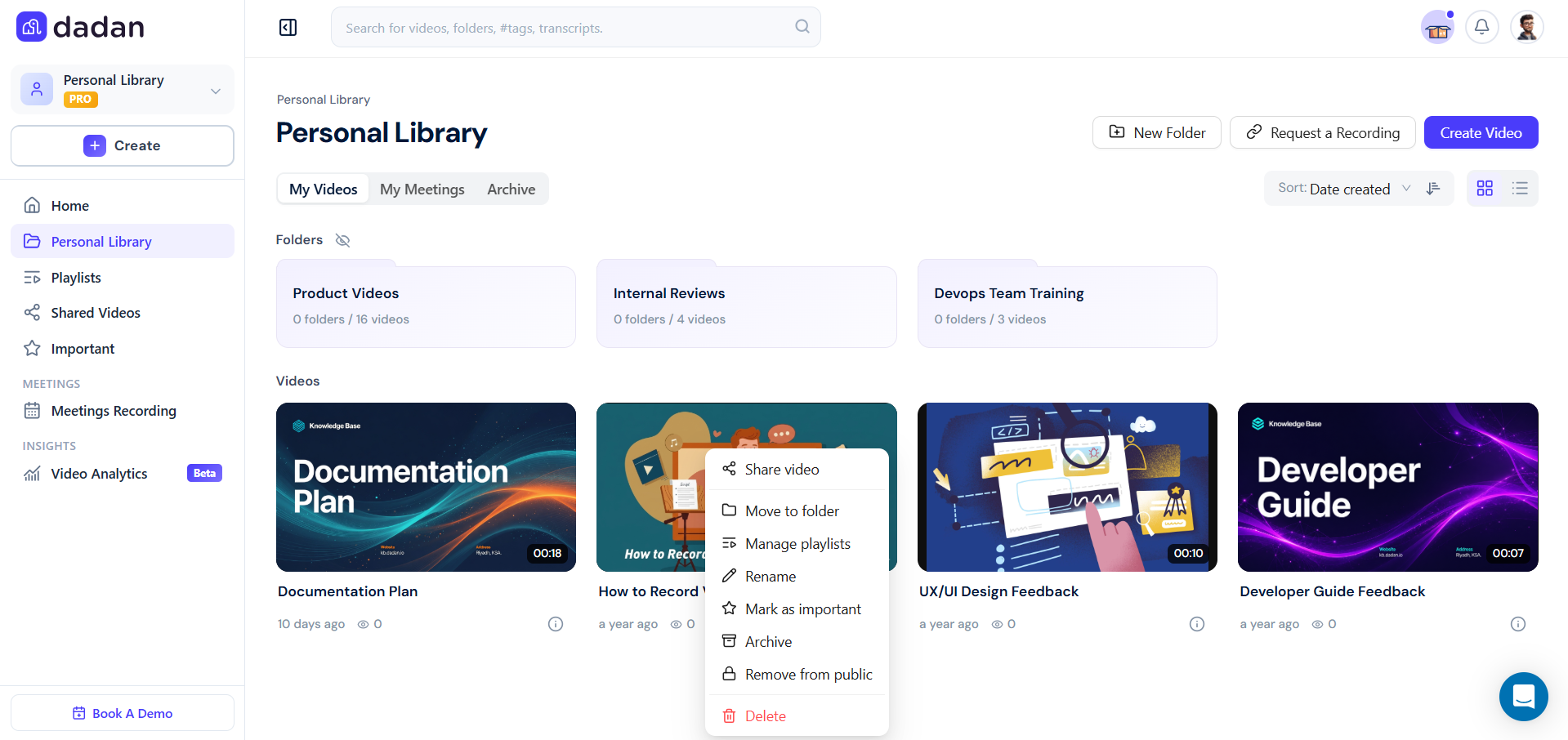
What is a knowledge base video? #
A knowledge base video is a short, focused recording embedded directly into your support articles to guide customers through a process, feature, or solution. Instead of reading step-by-step instructions, customers can watch and follow along in real time.
These videos typically:
- Demonstrate a process visually e.g., “How to reset your password”.
- Explain features in action so users see the product, not just text.
- Provide quick troubleshooting for common issues.
- Combine narration and visuals to make instructions clearer and more engaging.
Unlike long video tutorials or marketing content, knowledge base videos are usually short, task-oriented, and easy to replay. They are designed to help customers resolve their issues faster, without waiting for support.
Why use dadan as a knowledge base? #
Before you start building, it’s helpful to understand why a video knowledge base is important. Dadan is designed to:
- Centralized video hosting: Record, upload, and keep all your explainer, training, and update videos in one personal library.
- Centralized AI-powered search: Find specific topics, even inside transcripts, without rewatching full videos.
- Reusable content: Record once, share many times, and keep knowledge accessible to current and future team members.
- Interactive updates: Add timeline-anchored comments, resources, and feedback fields to keep content fresh.
How to build your video knowledge base in dadan #
To create a useful and sustainable video knowledge base, follow these steps:
- Organize videos in Team Spaces:
- Create dedicated team spaces for projects, departments, or training libraries.
- Control access and permissions so only the right people see sensitive content.
- Encourage each team to maintain its own space for quick discovery.
- Use tags and chapters:
- Apply tags like “onboarding,” “HR,” or “Product Alpha” for faster search.
- Add AI-generated chapters so viewers can jump directly to the section they need.
- Combine tags and chapters for maximum clarity.
- Add resources and context:
- Upload supporting documents, links, or slides in the Resources tab.
- Use descriptions to summarize the purpose of each video.
- Encourage contributors to add context, e.g., “This video explains Q2 reporting updates”.
- Keep it updated:
- Use dadan’s AI assistant to quickly update transcripts or summaries when things change.
- Mark outdated videos and link to newer versions.
- Set a review cycle for critical content (like policies or onboarding).
Keep your knowledge base fresh with editing tools #
A knowledge base should evolve as your processes and projects change. Instead of re-recording entire videos, dadan’s editing features let you keep content up to date with minimal effort:
- Trim and cut: Remove unwanted parts of a video without starting from scratch.
- Replace sections: Record a quick new clip and splice it into the original video.
- Update transcripts and captions: Use the AI assistant to instantly refresh text when changes happen.
- Highlight updates: Add a brief introductory content or note directing viewers to the latest information.
By using editing instead of recreating, your knowledge base stays current and reliable, while saving you time and effort.
Using video lists in your knowledge base #
Sometimes a single video isn’t enough to cover a complete process or related set of features. That’s where video lists come in. A video list is a collection of short, connected recordings grouped inside a single knowledge base article or help category.
With video lists, you can:
- Organize complex topics into smaller, digestible parts e.g., “Getting Started,” “Advanced Settings,” “Troubleshooting”.
- Create step-by-step learning paths where customers watch one video after another in logical order.
- Reduce confusion by keeping all related videos in one place, instead of spreading them across multiple pages.
- Improve reusability since the same video can appear in more than one list if it’s relevant to different topics.
For example, a “New User Onboarding” video list could include:
- Setting up your account.
- Customizing your profile.
- Navigating the main dashboard.
- First steps with integrations.
By presenting videos as a series rather than standalone clips, you create a mini learning hub inside your knowledge base, making it easier for customers to follow along and build confidence step by step.
Enhance your knowledge base with AI assistant and interactions #
Your video library becomes much more powerful when it’s supported by AI dadan’s AI assistant makes your knowledge base not just a storage hub, but an active, searchable, and interactive resource:
- Transcript-powered search: Find the exact moment in a video by searching transcripts, summaries, or even questions: “Where do I find the Q2 budget update?”.
- Smart summaries: Quickly review long recordings with concise AI-generated summaries or highlights.
- Interactive answers: Instead of scanning multiple videos, ask the AI assistant directly and get context-linked responses.
- Video Note Taker: Use AI to generate structured notes or HR/recruitment templates from any video.
- Engagement tracking: See how viewers interact, which videos they watch, what they comment on, and what questions they ask.
With these tools, your dadan knowledge base doesn’t just store information; it actively helps people discover, understand, and use it.
Example: HR onboarding library #
Instead of repeating the same live sessions, HR can:
- Record a set of onboarding videos (benefits, policies, tools).
- Tag them with “HR” and “Onboarding.”
- Add every new hire to a Team Space.
- Add FAQs in the comments so future employees see the answers upfront.
Result: Consistent, professional onboarding at scale.
Best practices #
To make your knowledge base more effective, keep these principles in mind:
- Keep videos short and focused: One topic per video works best.
- Use consistent naming: Example: “HR – Requesting vacation time.”
- Encourage contributions: Anyone can add knowledge videos, not just managers.
- Promote discovery: Remind teams that they can search before asking.
Key takeaways #
- A video knowledge base saves time and prevents repeated explanations.
- Dadan makes it easy to organize, tag, and share videos across your team.
- With transcript-powered search and reusable content, your knowledge grows stronger with every recording.
- By scaling across teams, your knowledge base evolves into a company-wide resource.


