
Every failure in the Record SDK carries a short, stable code. This page lists where errors arrive, what each code means and how to fix the problems developers run into most often.
Always branch on code, never on message. Messages are meant for logs and may be reworded.
Where errors arrive
Link to section: Where errors arrive| Integration | How you receive errors |
|---|---|
Built-in studio (createInstance) | The error event on configureButton(), with { code, message } |
React DadanRecordButton | The onError prop |
Vue DadanRecordButton | The error event |
Angular DadanRecorderService | .on("error", handler) on the object returned by configureButton() |
<dadan-recorder> | The dadan-error DOM event, with the code in event.detail.code |
DadanRecorder | The recording.error event, and rejected promises from methods such as start(), stop() and retryUpload() |
| Download helpers | A thrown VideoDownloadError with code and httpStatus |
Methods on DadanRecorder reject with a DadanSdkError:
import { DadanSdkError } from "@dadan-io/record-sdk";

try {
  await recorder.retryUpload();
} catch (error) {
  if (error instanceof DadanSdkError) {
    console.error(error.code, error.status, error.recoverable);
    if (error.recoverable) showRetryButton();
  }
}| Property | Meaning |
|---|---|
code | Stable code, for example mint_failed |
status | HTTP status, when the error came from a server response |
recoverable | true when trying again can succeed |
message | Short text such as mint_failed (500), safe to log |
detail | Raw server or network text for your logs. Never show it to users |
Error codes
Link to section: Error codesCamera, microphone and screen
Link to section: Camera, microphone and screen| Code | What happened | What to do |
|---|---|---|
permission_denied | The person or the browser blocked camera, microphone or screen access | Explain how to allow access in the browser, then let them try again from a new click |
device_not_found | No camera or microphone is available | Offer a mode that does not need it, such as screen or audio |
device_in_use | Another app is using the device, or the browser aborted capture | Ask the person to close other apps that use the camera |
constraint_failed | The device cannot record at the requested quality | Create the recorder again with a lower recordingQuality |
start_failed | Capture could not start for another reason | Retry, and check browser support |
recorder_error | The browser’s recorder failed during recording | The partial take is kept. Offer to upload it or discard it |
unsupported | The browser lacks a required API, or the page is not secure | Check isSupported() before showing the record button |
Access and upload
Link to section: Access and upload| Code | What happened | What to do |
|---|---|---|
auth_failed | Dadan refused to start an upload session, usually because the page’s origin is not allowlisted | See Couldn’t start recording |
auth_expired | An upload token expired or was rejected | Create the recorder again |
publicAppId_required | No public app ID was passed | Pass publicAppId |
session_failed, session_unreachable, session_invalid_response | The session request was refused, timed out (after 30 seconds) or returned something unexpected | Retry later and check the public app ID and origin |
mint_failed, mint_unreachable, mint_invalid_response | Dadan could not create the video record | Offer retryUpload() |
upload_failed | The upload failed after automatic retries | Offer retryUpload(). The take is kept in the browser |
upload_cancelled, cancelled | Your code or the person cancelled | Usually nothing to do |
endpoint_rejected | The upload address returned by the server failed the SDK’s safety checks | Contact Dadan support |
quota_exceeded | A limit was reached | Log it and show a general message |
Calls in the wrong order
Link to section: Calls in the wrong orderalready_recording, already_starting, upload_in_progress, stop_in_progress, not_recording, not_paused, cannot_switch_device_while_recording, no_blob_to_upload, videoId_required, not_initialized and destroyed mean a method was called in a state that does not allow it. Check getState() and the order of your calls.
| Code | Meaning |
|---|---|
hook_rejected, hook_aborted | Your hook returned false or aborted. This is a quiet stop, not a failure, so there is nothing to show |
hook_timeout | A hook took longer than hookTimeoutMs (10 seconds by default) |
track_ended_stop_failed, limit_stop_failed | Stopping after a source ended, or after the time limit, failed. Offer to retry or discard |
start_aborted | cancel() or destroy() was called while recording was starting |
Download helpers use their own codes, such as ORIGIN_DENIED and VIDEO_STILL_PROCESSING. They are listed in Embed and download recordings.
Warnings are not errors
Link to section: Warnings are not errorsmedia.warning reports a problem that does not stop the recording:
reason: "unavailable": the microphone could not be used inscreenorbothmode. Recording continues without it.reason: "ended": the microphone or camera stopped during recording, for example because it was unplugged.
The built-in studio shows its own notice for both cases. In a custom interface, tell the person so they are not surprised by a silent video.
Troubleshooting
Link to section: TroubleshootingCouldn’t start recording
Link to section: Couldn’t start recordingThe studio shows “Couldn’t start recording. Check that this page Origin is allowlisted for your Dadan public app, then try again.” and you receive auth_failed with the message session_failed (403 ORIGIN_DENIED).
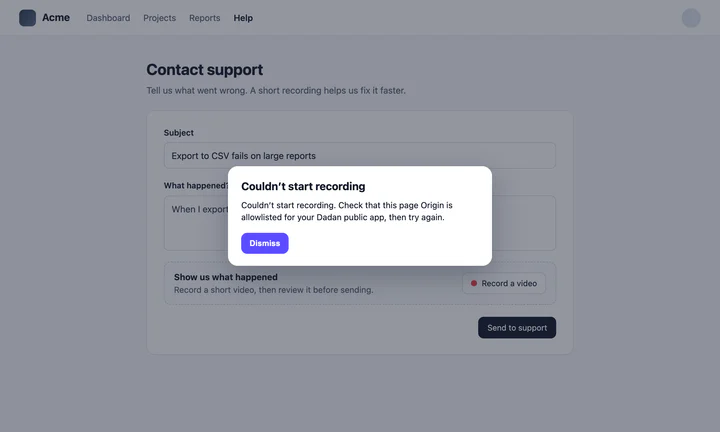
The origin in the address bar must exactly match one of the origins allowlisted for your public app ID:
- The scheme counts:
http://andhttps://are different. - The host counts:
example.com,www.example.comand127.0.0.1versuslocalhostare all different. - The port counts:
http://localhost:5173andhttp://localhost:3000are different.
In the browser console, a refused session can also appear as a CORS error or as “Failed to fetch”. The fix is the same. To add an origin, open Account & Settings, then Developers, and edit your app in the Public Apps section. See Get a public app ID.
The record button does nothing or stays disabled
Link to section: The record button does nothing or stays disabled- Check that the page is served over HTTPS or from
localhost. Browsers block capture on otherhttp://pages, andisSupported()returnsfalse. - Open the browser console and look for errors from the SDK.
- Make sure the studio was created before the click. With your own button, keep it disabled until the SDK is ready, as the framework guides show.
Screen recording is not offered on phones
Link to section: Screen recording is not offered on phonesThat is expected. Mobile browsers do not support screen capture, so only camera and audio are available there.
The browser denies screen recording on a Mac
Link to section: The browser denies screen recording on a MacmacOS must allow the browser to record the screen. Open System Settings, go to Privacy & Security, then Screen & System Audio Recording (called Screen Recording on older versions), enable your browser and restart it.
The recording has no system audio
Link to section: The recording has no system audioSystem and tab audio depend on the browser and the operating system. In Chrome and Edge, audio is most reliable when the person shares a tab and turns on the option to share its audio in the browser’s picker. Microphone audio is not affected.
An upload failed
Link to section: An upload failedThe take stays in the browser, so nothing is lost straight away. Offer a retry: in the built-in studio, the person can click Retry upload; with DadanRecorder, call retryUpload(). If the page is reloaded, the studio offers to restore the take for up to 24 hours.
Download links return VIDEO_STILL_PROCESSING
Link to section: Download links return VIDEO_STILL_PROCESSINGNew uploads need a short processing time. Use fetchVideoDownloadWithRetry or recorder.fetchDownload(), which retry automatically.
TypeScript cannot find @dadan-io/record-sdk-ui/wc
Link to section: TypeScript cannot find @dadan-io/record-sdk-ui/wcYour tsconfig.json uses the legacy "moduleResolution": "node". Switch to "bundler", "node16" or "nodenext", which understand package subpath exports.
Vite warns about “use client”
Link to section: Vite warns about “use client”Vue and plain JavaScript projects may see one warning about a "use client" directive from the studio package. It is harmless and can be ignored.
Styles are blocked by a Content Security Policy
Link to section: Styles are blocked by a Content Security PolicyThe studio injects a <style> element. Pass your CSP nonce (styleNonce, or the nonce attribute on <dadan-recorder>). See the production checklist.
Still stuck?
Link to section: Still stuck?Contact Dadan support from this Help Center. Include the error code, the message, the page origin, your browser and operating system, and your public app ID. Do not send upload tokens or your API key.
))

))