
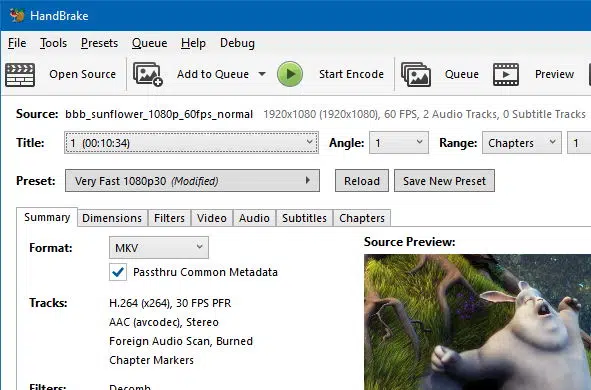
If you face issues uploading a video to dadan, it usually means the file format or settings aren’t supported. To fix this, you can use a free tool like HandBrake to convert your video.
HandBrake is a free, open-source video conversion tool that allows you to convert video from nearly any format to a selection of widely supported codecs. We recommend exporting your video using the media specifications in the table below (H.264/AAC to an MP4 file).
This article explains the difference between codec and file extension, and what each recommended setting means.
Codec vs file extension #
When working with video files, two terms can be confusing: codec and file extension.
- Codec (Compressor/Decompressor):
A codec is the method used to compress and decompress video or audio data. It decides how the content is stored and how much space it takes.- Example: H.264 (video), AAC (audio).
- File Extension (Container):
The extension (e.g., .mp4, .mkv, .avi) is the container that holds your video, audio, subtitles, and metadata.- Think of it as the cup, while the codec is the juice inside.
👉 In short:
- Codec = how the content is processed.
- Extension = the type of file that wraps it all up.
Recommended settings for dadan #
When converting your video with HandBrake, use these settings to make sure it works smoothly in dadan:
🎥 Video #
- Codec: H.264
- Frame Rate: 30 fps (images per second)
- Bitrate: Variable (adjusts automatically to balance size and quality)
🔊 Audio #
- Codec: AAC
- Sample Rate: 48 kHz (standard for video audio)
- Channels: Mono (1 channel)
- Bitrate: Variable
📺 Resolution #
Dadan supports up to 4K video. You can upload:
- 360p, 480p, 720p, 1080p, 1440p, or 2160p
| Video | Codec: H.264, Frame Rate: 30 fps, Bitrate: Variable bitrate. |
| Audio | Codec: AAC, 48kHz, Channels: 1 Channel (Mono), Variable bitrate. |
| Resolution | Up to 4K video (360p, 480p, 720p, 1080p, 1440p, 2160p). |
Why these settings matter #
- H.264/AAC in MP4 are the most widely supported formats, so your video will play on all browsers and devices.
- 30 fps ensures smooth playback without unnecessary file size.
- Variable bitrate keeps a good balance between video quality and upload speed.
- Mono audio keeps things lightweight, perfect for training, demos, or explainers.
Next step #
If your video doesn’t upload to dadan:
- Download HandBrake (free).
- Open your video file.
- Export it as an MP4 with the settings above.
- Upload it again to dadan.


