
If the dadan Pro plan no longer fits your needs, you can cancel your subscription quickly and easily. This short guide walks you through the steps to cancel your plan and explains what happens afterward.
Downgrading to the Free Plan will remove access to several Pro features, including unlimited videos, advanced editing tools, and team collaboration options. Before you cancel, it’s helpful to understand what changes to expect so you can plan accordingly.
- See before: Dadan plans and subscriptions.
Steps to cancel your dadan subscription #
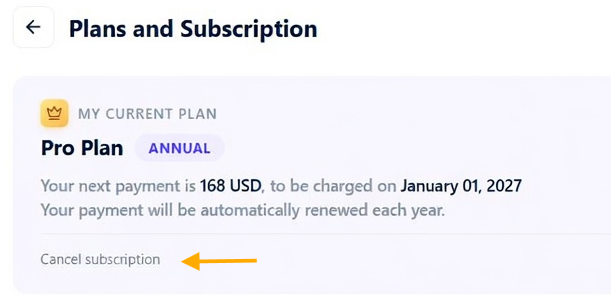
To cancel your subscription:
- Click the Cancel subscription button under the Plans and Subscriptions section.
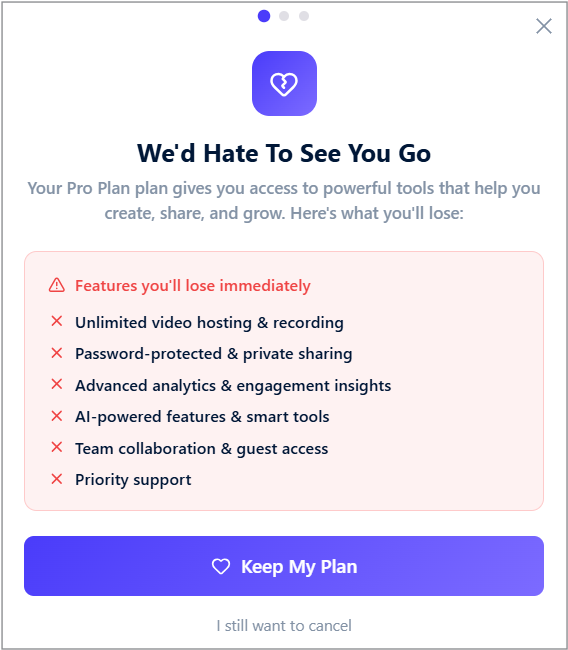
- Confirm your choice in the pop-up window to complete the cancellation.
What you’ll lose after canceling the Pro plan #
After the end of your billing period, your account will be downgraded to the Free Plan. This means you will lose access to the following features:
| Feature | Pro Plan | Free Plan After Cancellation |
|---|---|---|
| Video Limit | Unlimited | 25 videos |
| Max Video Length | Unlimited | 5 minutes |
| Storage | Unlimited | 20 GB |
| Video Quality | 4K | 720p |
| Advanced Features | All included | Not available |
For the complete list of Pro plan features, refer to Pricing – dadan.io.
You’ll still have access to your existing videos, but only up to the Free Plan limit of 25 videos and 20 GB storage. Any excess content may be restricted or removed.


