
Organizing your dadan video library helps you quickly find what you need, especially when you have many recordings across your Personal Library and Team Space. The sort of feature allows you to manage your videos efficiently, sorted by Name (A-Z) or Date (newest to oldest).
Looking for the full guide on video management? Check out the complete video management guide.
Steps to sort your videos #
To sort your videos by name or date, follow these steps:
- Go to the Personal Library or Team Space where you want to upload the video.

- Find the Sort field.
- Click the drop–down arrow to select your preferred sorting option: Date created or Name.
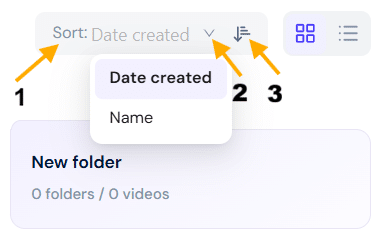
- To sort the videos in ascending/descending order, click the ascending/descending button.
Tip: Sorting is especially useful when working with large teams or organizing videos after a big upload session. Use it regularly to keep your workspace clean and easy to navigate.


