
Keeping your workspace tidy is easier when you can sort your folders the way you like. In dadan, you can sort folders by name or date created, and choose between ascending and descending order.
This quick guide will walk you through how to use the sorting feature.
Looking for the full guide on managing folders? Check out the complete folder management guide.
Steps to sort your folders #
To create a folder, follow these steps:
- Log in to your dadan account. The Home page opens by default.
- You can switch to the Personal Library, a Team Space, or any other location to sort a folder.

- Find the Sort field.
- Click the drop–down arrow to select your preferred sorting option: Date created or Name.
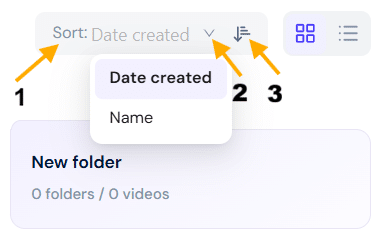
- To sort the folders in ascending/descending order, click the ascending/descending button.
Tip: Sorting is a great way to alphabetically prioritize recent work or group folders, depending on your workflow.


