
Dadan’s video comments feature enables users to leave precise, contextual feedback directly on videos. This tool enhances communication for team collaboration, asynchronous discussions, and content reviews by making feedback more interactive and actionable.
One of dadan’s standout features is Timeline-Anchored Comments, which allows users to attach feedback to specific timestamps. This ensures clarity by pinning comments to exact timestamps, eliminating confusion.
Dadan timeline-anchored comments #
There are two types of video comments in dadan:
- Usual comments: These apply to the entire video and are not linked to a specific timestamp. It points to 00:00.
- Timeline-anchored comments: These are attached to a specific moment in the video, ensuring feedback is clear and relevant to the point under discussion.
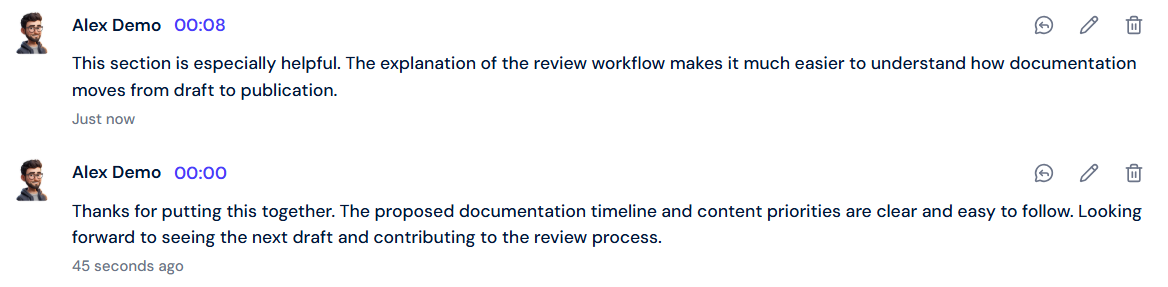
Unlike general comments, Timeline-Anchored Comments appear at a particular timestamp in the video. This eliminates confusion and improves efficiency when reviewing content.
Benefits and use cases of timeline-anchored comments #
Why use timeline-anchored comments?
Imagine you are reviewing a 10-minute video and needing to clarify a mistake at 3:40. Instead of writing “‘Check 3:40 for the typo”, timeline-anchored comments let you leave the note directly at that time point, so everyone sees it instantly.
Key benefits:
- Clearer feedback: Comments appear at exact timestamps, facilitating understanding of the context.
- Improved collaboration: Teams can discuss specific sections without lengthy explanations.
- Faster revisions: Viewers can quickly jump to feedback points, speeding up edits and approvals.
- Better engagement: Encourages focused discussions on relevant parts of the video.
Common use cases:
- Content reviews: Provide direct feedback on video presentations, tutorials, or marketing materials.
- Team collaboration: Discuss and refine ideas without scheduling meetings.
- Training & onboarding: Highlight key points in instructional videos for new employees.
- Bug reporting: Developers and testers can pinpoint issues in recorded demos.
To effectively use dadan timeline-anchored comments, follow this guide: How to use a timeline-anchored comment in dadan.


